In high-performance OLAP databases like ClickHouse, issuing a DELETE command does not immediately erase data from the disk. Built on Log-Structured Merge (LSM) trees, these systems prioritize write speed by treating deletions as asynchronous background tasks. While this architecture offers immense performance, it creates a dangerous “Persistence Latency”—a time gap where data is logically invisible to queries but physically intact in storage.
This post explores the hidden mechanics of LSM deletions and the risks they pose to GDPR compliance and data governance. We explain why your “deleted” data might persist for weeks, how it can contaminate backups, and the engineering strategies—from Forced Compaction to Crypto-Shredding—you need to implement to ensure that when you say a record is gone, it’s truly gone.
Why “Delete” Doesn’t Mean “Gone” in LSM Trees
In Log-Structured Merge (LSM) trees, the fundamental design principle is to optimize for write performance by making all operations sequential and append-only. This means that once data is written to a file on disk (an SSTable), that file is immutable and can never be modified. Therefore, a “delete” operation cannot simply find the original data and erase it. Instead, the database performs a new write operation, appending a special marker known as a tombstone for that specific key. This tombstone serves as a logical signal that the data is now invalid, even though the original record still physically exists in an older, immutable file.
For example, imagine you insert a user’s profile: PUT(user_id=101, "Alice"). This data is eventually flushed to an immutable file, let’s call it SSTable-A. Later, you issue a DELETE(user_id=101) command. The database does not touch SSTable-A. Instead, it creates a new entry, PUT(user_id=101, TOMBSTONE), which gets flushed to a new file, SSTable-B. When a query comes in for user_id=101, the system checks the newest files first. It finds the tombstone in SSTable-B and immediately returns “not found,” correctly ignoring the “Alice” data that still physically resides in the older SSTable-A. The data is logically gone, but physically it remains until a background merge process (compaction) combines the two SSTables and discards the obsolete records.
The image below provides a simple visual explanation of this process:
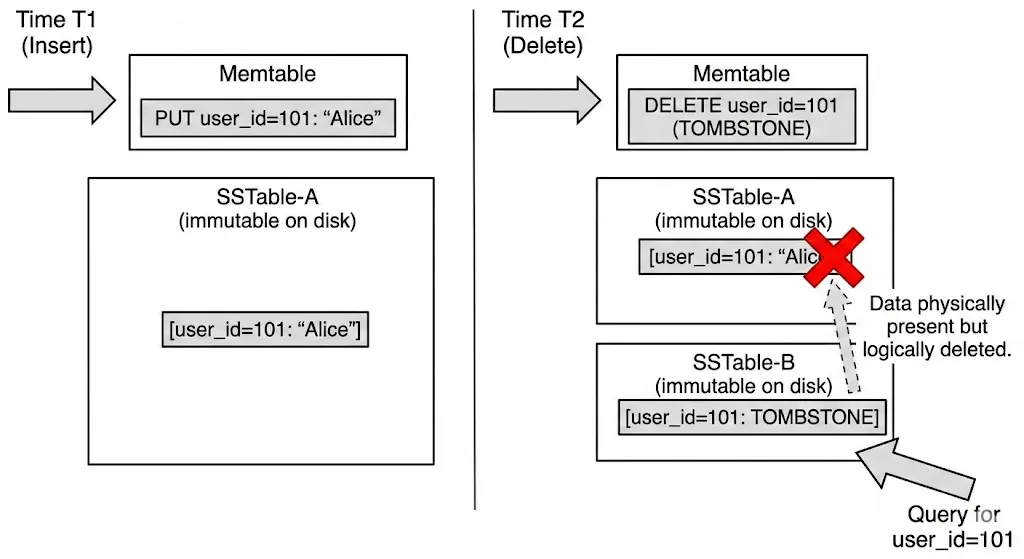
Why Deleted Data Stays on Disk
In traditional databases like MySQL (using B-Trees), a delete operation often immediately frees up space or marks a page as empty. In LSM-based systems like ClickHouse, however, deletion is a two-step process with vastly different timelines. This gap creates what we call the “Deletion Latency Trap,” where data you believe is gone is actually just hiding in plain sight.
The process is split into two distinct phases:
- Phase 1: Logical Deletion (The “Fast” Part)
This happens almost instantly. When you issue a delete command, the database acknowledges the request and writes a “mask” or “tombstone” (as discussed in the previous section). From the perspective of your application’s queries, the data is gone. A
SELECTquery running 1 second later will not return the deleted rows. This gives a false sense of security that the cleanup is complete. - Phase 2: Physical Deletion (The “Slow” Part) This is where the trap lies. The actual bits on the disk are not touched during the logical deletion. The data remains fully intact within the immutable data parts (SSTables) until the background “compaction” or “merge” process runs. This process is non-deterministic—it runs when the database decides it’s efficient to do so, based on IO load and the number of parts.
Compliance Risks with Background Deletion
The technical quirk of “deletion latency” stops being just an engineering curiosity and becomes a serious business risk when it collides with data privacy regulations. Whether it is GDPR (Europe), CCPA (California), or HIPAA (Healthcare), the core requirement is often the same: when a user asks for their data to be deleted, or when a retention period expires, that data must be effectively destroyed within a specific timeframe.
Most privacy laws assume a “Hard Delete” model (erased means erased), but LSM-based databases operate on an “Eventual Delete” model.
If your ClickHouse or Cassandra cluster is configured with a very long old_parts_lifetime, or if merges are stalled due to high load, that “eventual” deletion might stretch beyond the legal window (often 30 to 45 days). You could find yourself in a situation where your application claims the user is deleted—because the queries return empty results—but a forensic disk scan would reveal the user’s full name, email, and address sitting plainly in an unmerged file. In the eyes of a strict auditor, the data was never actually destroyed.
Engineering the “Hard Delete”: Strategies for Compliance
So, how do you satisfy a “Right to Erasure” request when your database architecture fundamentally resists deleting things? You cannot fight the LSM tree design, but you can engineer around it. Here are three strategies to ensure “gone” really means “gone.”
A. Forcing Compaction
If you need immediate physical deletion, you can force the database to merge its parts. In ClickHouse, this is done via the OPTIMIZE command.
- The Command:
OPTIMIZE TABLE users FINAL; - What it does: This instructs the database to immediately rewrite all data parts, physically removing any rows marked for deletion.
- The Catch: This is extremely resource-intensive. It imposes a heavy I/O and CPU load and can lock tables. It is not suitable for frequent use (e.g., deleting users one by one in real-time) but is excellent for a nightly or weekly “cleanup” script to ensure compliance before backups run.
B. Aggressive TTLs
Instead of relying on manual deletes, you can configure the database to clean itself up. ClickHouse supports TTL (Time-To-Live) clauses on tables.
- Strategy: If your data retention policy is fixed (e.g., “logs are kept for 90 days”), you can set a TTL on the table schema. ClickHouse will automatically schedule merges to remove expired data.
- Tuning: You can tighten the
merge_with_ttl_timeoutsetting to force these checks to happen more frequently (e.g., every 1 hour instead of the default 4 hours), reducing the window where expired data lingers on disk.
C. Crypto-Shredding
The most robust solution for GDPR compliance in immutable storage isn’t to delete the data—it’s to make it unreadable. This technique is called Crypto-Shredding.
How it works:
- Encryption per ID: Every sensitive record (or user profile) is encrypted with a unique encryption key specific to that user.
- Key Storage: These keys are stored in a separate, highly transactional Key Management System (KMS) or a traditional SQL table (like Postgres) that supports immediate deletes.
- The Delete: When a user asks to be deleted, you don’t hunt through terabytes of immutable logs. You simply delete their specific encryption key from the Key Store.