What is a LSM tree?
If you’ve ever wondered how modern databases handle a relentless firehose of data without breaking a sweat, the answer is likely an LSM Tree (Log-Structured Merge-Tree).
Think of it as the ultimate productivity hack for data storage. Instead of trying to find the “perfect” spot for every piece of data on a slow hard drive immediately (which is like trying to file papers in a cabinet while a gale-force wind is blowing), the LSM Tree takes a more relaxed—and much faster—approach.
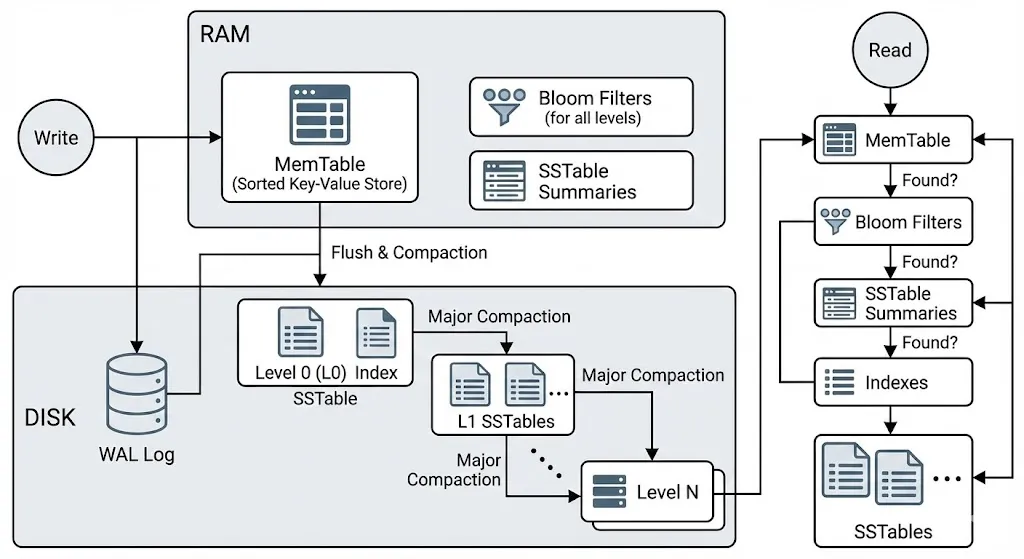
In this blog, we’re going to peel back the layers and dive deep into exactly how these Read and Write operations work under the hood. Let’s get into it!
How write works in LSM Tree?
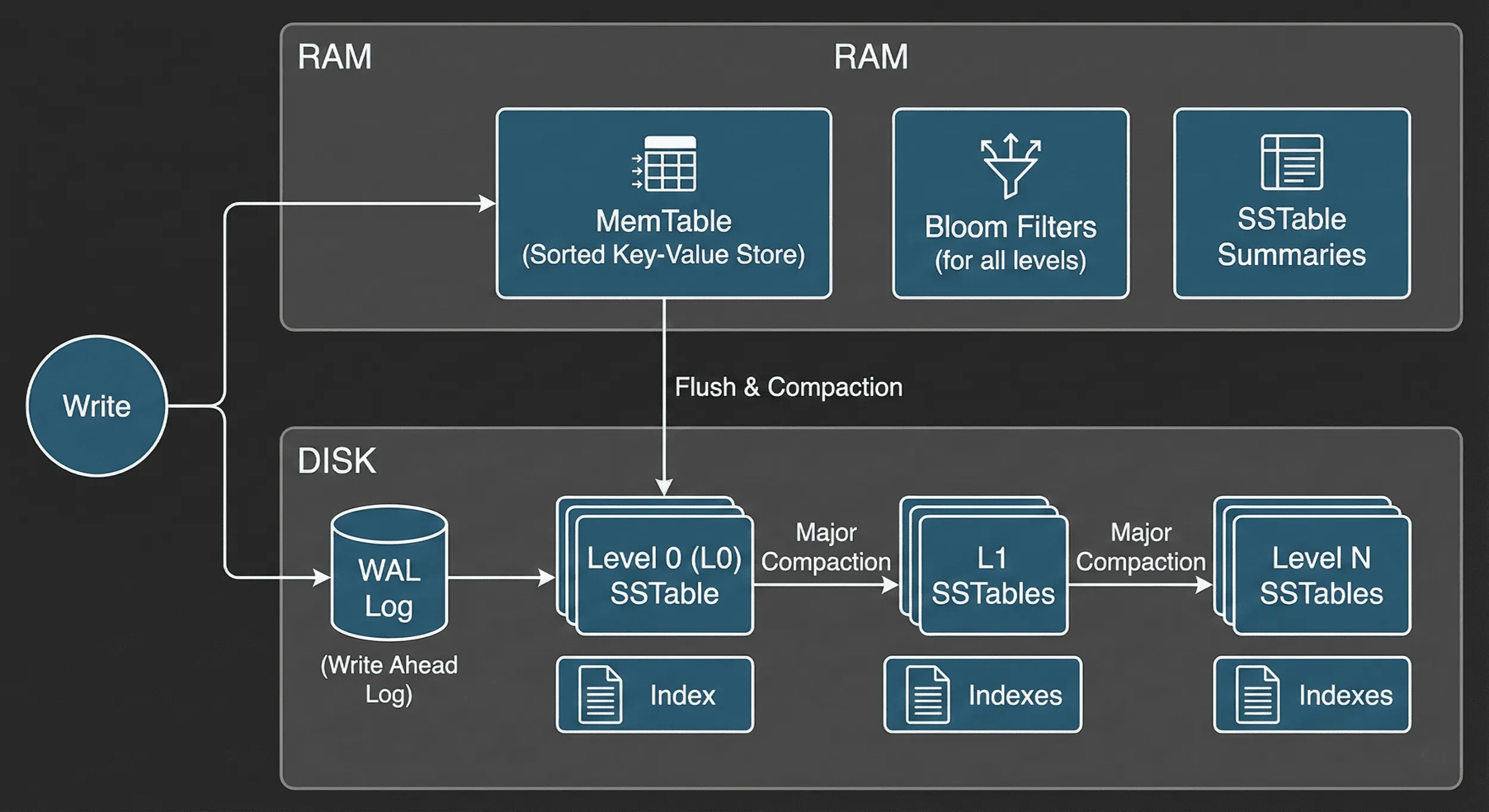
Writing data in an LSM Tree isn’t just a simple “save” command—it’s a carefully orchestrated relay race designed for maximum speed and safety. Here is how a piece of data makes its journey:
Step 1: Writing to MemTable
When you send a write request, the LSM Tree doesn’t head straight for the disk (which is slow). Instead, it hits the MemTable. This is an in-memory structure that acts like a high-speed scratchpad. Because it’s in RAM, this operation is near-instant.
Step 2: The WAL
You might be thinking: “Wait, if it’s in RAM and the power goes out, don’t I lose my data?” Spot on. That’s where the Write-Ahead Log (WAL) comes in. Simultaneously with the MemTable write, the database appends the operation to a log file on the disk.
- The trick: This is a “sequential” write, which is much faster than searching for a specific spot on the disk. It’s a simple, chronological list of every change made, serving as your ultimate safety net if the system crashes.
Step 3: Flushing to SSTables
The MemTable has a weight limit. Once it hits a certain size, it’s “frozen” and its contents are flushed to the disk as an SSTable (Sorted String Table).
Once the data is safely tucked away in an SSTable, the corresponding WAL entries are cleared because they’re no longer needed for recovery. The desk is clean, and the cycle starts all over again!
Why SSTables are the Secret Sauce
An SSTable is essentially a sorted dictionary of your data. Because it’s immutable (meaning it never changes once written), the database doesn’t have to worry about complex locking or fragmentation.
As more data arrives, these tables are organized into Levels:
- Level 0: Freshly flushed data.
- Level 1, 2, 3…: Older data that has been merged and compressed.
The Bottom Line: Efficiency
By batching these writes and only hitting the disk periodically, the LSM Tree avoids the “death by a thousand cuts” of frequent, tiny disk updates. It turns chaotic, random writes into organized, sequential streams—which is exactly what modern hardware loves.
How is data read from LSM Tree?
If writing to an LSM Tree is a high-speed race, reading is more like a high-stakes scavenger hunt. Because your data could be in memory, on disk, or spread across multiple layers, the database needs a strategic plan to find it without digging through every single file.
Here is the step-by-step search order:
1. Search in MemTable
The search always starts at the MemTable. Since this is the “freshest” data, there’s a good chance the information you’re looking for is right there in RAM. If the LSM Tree finds it here, the search ends instantly. Result: Maximum speed.
2. Search Disk using Bloom Filters
If the data isn’t in memory, we have to look at the disk. But checking dozens of SSTables would be incredibly slow. To solve this, the LSM Tree uses a secret weapon: the Bloom Filter.
Think of a Bloom Filter as a “bouncier” for each SSTable. You ask, “Hey, is User #123 in here?”
- “Definitely No”: The LSM Tree skips that file entirely without even opening it.
- “Maybe”: The LSM Tree takes a closer look inside that specific SSTable.
3. SSTables Lookup
Once a Bloom Filter gives us a “Maybe,” the LSM Tree checks the SSTables, starting from the newest (Level 0) and moving toward the oldest (Level N).
Because each SSTable is sorted, the database doesn’t have to read the whole file. It uses an index to jump straight to the general area where your key should be. It’s like using the thumb tabs in a physical dictionary to find a word—you don’t start at ‘A’ if you’re looking for ‘Z.‘
The “Stale Data” Problem
What happens if the data is in two different layers? For example, if you updated a user’s email, the old email might be in an old SSTable, and the new email might be in the MemTable. The LSM Tree always trusts the freshest version it finds first. This ensures you always get the most up-to-date information, even if the “ghosts” of old data are still lurking in the deeper layers.
Modern databases using LSM Tree
If you think LSM Trees are just a niche computer science concept, think again! They are the secret engine under the hood of some of the world’s most powerful databases. Apache Cassandra and ScyllaDB use them to handle the massive, write-heavy workloads of companies like Netflix and Discord. RocksDB, developed by Facebook, is so efficient that it’s often used as the storage foundation for other databases like CockroachDB and TiDB. Even time-series powerhouses like InfluxDB rely on LSM logic to ingest millions of data points per second. Basically, if a system needs to stay fast while being pelted with a non-stop firehose of data, there’s a good chance an LSM Tree is doing the heavy lifting
References
https://cassandra.apache.org/doc/latest/cassandra/architecture/storage-engine.html
https://www.scylladb.com/glossary/log-structured-merge-tree/