Welcome back to the series!
Where we left off: In Part 5, we solved the passive knowledge problem. By loading domain-specific skills on-demand instead of stuffing them into the system prompt, we kept our instructions lean and our model focused.
But there’s a bigger monster lurking. Even with optimized instructions and clean subagent handoffs, the parent agent’s own conversation history keeps growing. Today, we’re going to kill it. The motto for this lesson is: “Context will fill up; you need a way to make room.”
The Problem: Context Fills Up
Let’s do some quick math. A single read_file call on a 1,000-line source file costs roughly 4,000 tokens. A bash command that runs tests might return 2,000 tokens of output. After the agent reads 30 files and runs 20 commands, the conversation is sitting at 100,000+ tokens.
Subagents (Part 4) help with exploratory detours by isolating their bloated histories. But the parent agent’s own conversation — the one coordinating the entire task — still grows unbounded with every tool call it makes directly.
Without compression, the agent hits a hard wall. It either runs out of context window space entirely, or (worse) the model starts losing track of early instructions as they get pushed further from its attention window. For large codebases and long-running sessions, this is a death sentence.
The Solution: Three-Layer Compression
The fix is a graduated compression strategy. Three layers, increasing in aggressiveness:
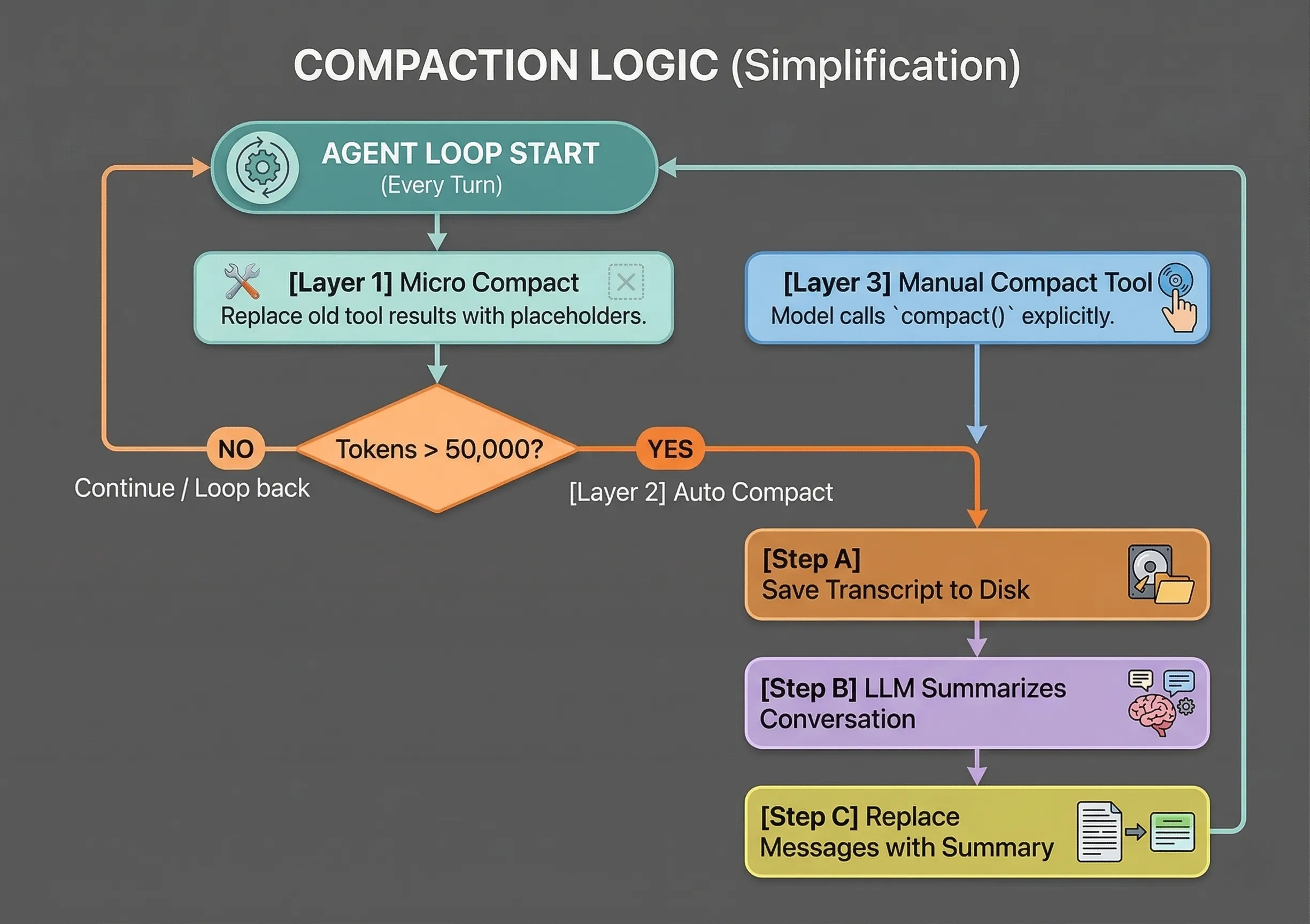
Let’s break down each layer.
Layer 1 — Micro Compact (Silent, Every Turn)
Before each LLM call, we scan the message history for old tool results. Anything older than the most recent N results gets its content replaced with a tiny placeholder like [Previous: used read_file]. The raw file contents and bash outputs from 10 turns ago are almost never needed again — but the fact that those tools were called still provides useful context.
Layer 2 — Auto Compact (Token Threshold Trigger)
When the estimated token count crosses a threshold (say, 50,000), we trigger the nuclear option. First, we save the entire conversation transcript to a .transcripts/ directory on disk as a JSONL file — nothing is lost. Then, we ask the LLM itself to summarize the conversation into a concise continuity message. Finally, we replace all messages with that single summary. The context window is now nearly empty, but the agent knows exactly where it left off.
Layer 3 — Manual Compact (Agent-Triggered Tool)
We also give the agent a compact tool. This lets the model choose to compress when it senses things are getting unwieldy, even before the automatic threshold kicks in. It triggers the exact same summarization logic as Layer 2.
How It Works (In Code)
Step 1: Micro Compact
This function runs silently before every LLM call. It finds all tool_result blocks in the message history and replaces old ones with lightweight placeholders.
KEEP_RECENT = 3  # Keep the last 3 tool results intact

def micro_compact(messages: list) -> list:
    tool_results = []
    for i, msg in enumerate(messages):
        if msg["role"] == "user" and isinstance(msg.get("content"), list):
            for j, part in enumerate(msg["content"]):
                if isinstance(part, dict) and part.get("type") == "tool_result":
                    tool_results.append((i, j, part))

    if len(tool_results) <= KEEP_RECENT:
        return messages

    for _, _, part in tool_results[:-KEEP_RECENT]:
        if len(part.get("content", "")) > 100:
            part["content"] = "[Previous: used tool]"

    return messages
Step 2: Auto Compact
When tokens exceed the threshold, we archive everything and let the LLM summarize. The transcript is saved to disk first, so absolutely nothing is lost.
def auto_compact(messages: list) -> list:
    # Archive full transcript to disk
    transcript_path = TRANSCRIPT_DIR / f"transcript_{int(time.time())}.jsonl"
    with open(transcript_path, "w") as f:
        for msg in messages:
            f.write(json.dumps(msg, default=str) + "\n")

    # LLM summarizes for continuity
    response = client.messages.create(
        model=MODEL,
        messages=[{"role": "user", "content":
            "Summarize this conversation for continuity:\n"
            + json.dumps(messages, default=str)[:80000]}],
        max_tokens=2000,
    )

    return [
        {"role": "user", "content": f"[Compressed]\n\n{response.content[0].text}"},
    ]
Step 3: Plug Into the Loop
Both layers integrate cleanly into the same while loop we built in Part 1. Micro compact runs every turn. Auto compact triggers on threshold. Manual compact is just another entry in our Dispatch Map from Part 2.
def agent_loop(messages: list):
    while True:
        micro_compact(messages)                        # Layer 1

        if estimate_tokens(messages) > THRESHOLD:
            messages[:] = auto_compact(messages)       # Layer 2

        response = client.messages.create(
            model=MODEL, system=SYSTEM,
            messages=messages, tools=TOOLS,
            max_tokens=8000,
        )
        # ... tool execution (same as before) ...

        if manual_compact_requested:
            messages[:] = auto_compact(messages)       # Layer 3
The Key Insight
Transcripts preserve full history on disk. Nothing is truly lost — just moved out of active context. This is the same principle as virtual memory in operating systems: keep the hot data in RAM, page the rest out to disk. The agent’s working memory stays razor-sharp while the complete record remains recoverable at any time.
Conclusion
With context compaction, our agent can now handle infinite-length sessions on arbitrarily large codebases. The three layers work together as a graduated safety net: micro compact quietly trims the fat every turn, auto compact steps in before things overflow, and the manual tool gives the agent itself a pressure valve.
Combined with subagents (Part 4) for exploratory isolation and skill loading (Part 5) for lean instructions, our agent now has a complete memory management strategy for single sessions.
Next time, we’ll promote our flat to-do checklist into a persistent task graph with dependencies — goals that survive compression and restarts, laying the foundation for multi-agent collaboration. See you then!