Understanding Claude Skills
Anthropic introduced Claude Skills (often referred to as Agent Skills) to bridge the gap between a general-purpose assistant and a specialized AI agent by providing a modular framework for procedural knowledge. It was built to allow users and organizations to “onboard” Claude with specific instructions, scripts, and brand guidelines that the model can discover and load dynamically based on the task at hand.
This feature specifically solves the problem of repetitive prompting, where users previously had to manually paste complex instructions into every new chat, and context window bloat, by utilizing a “progressive disclosure” architecture. Instead of overwhelming the model with all possible instructions at once, Claude only triggers and loads the relevant “Skill” when needed—making the AI significantly more consistent, efficient, and capable of executing specialized workflows (like filing Jira tickets or enforcing specific code styles) without losing reasoning speed.
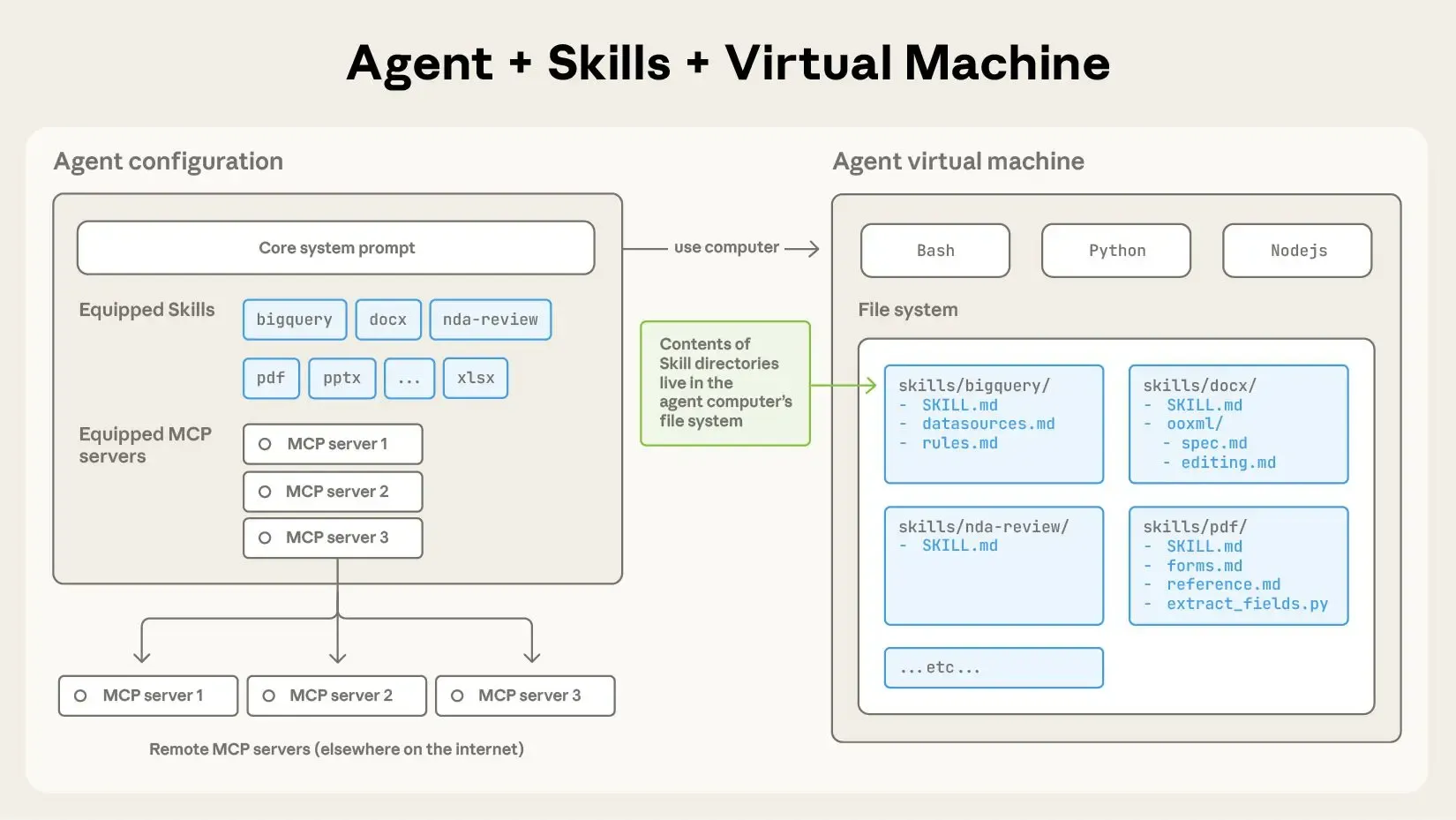
What a skill actually looks like
So basically, a skill is just a folder with a SKILL.md file in it. That file needs to kick off with some YAML frontmatter that has a couple of key things: name and description. When the agent starts up, it grabs the name and description from all your installed skills and drops them into its system prompt.
This metadata is the first level of progressive disclosure: it gives Claude just enough info to figure out when to use each skill without dumping everything into memory at once. The main content of the file is the second level. If Claude decides the skill is useful for what you’re working on, it’ll actually load the whole SKILL.md file to get the full details.
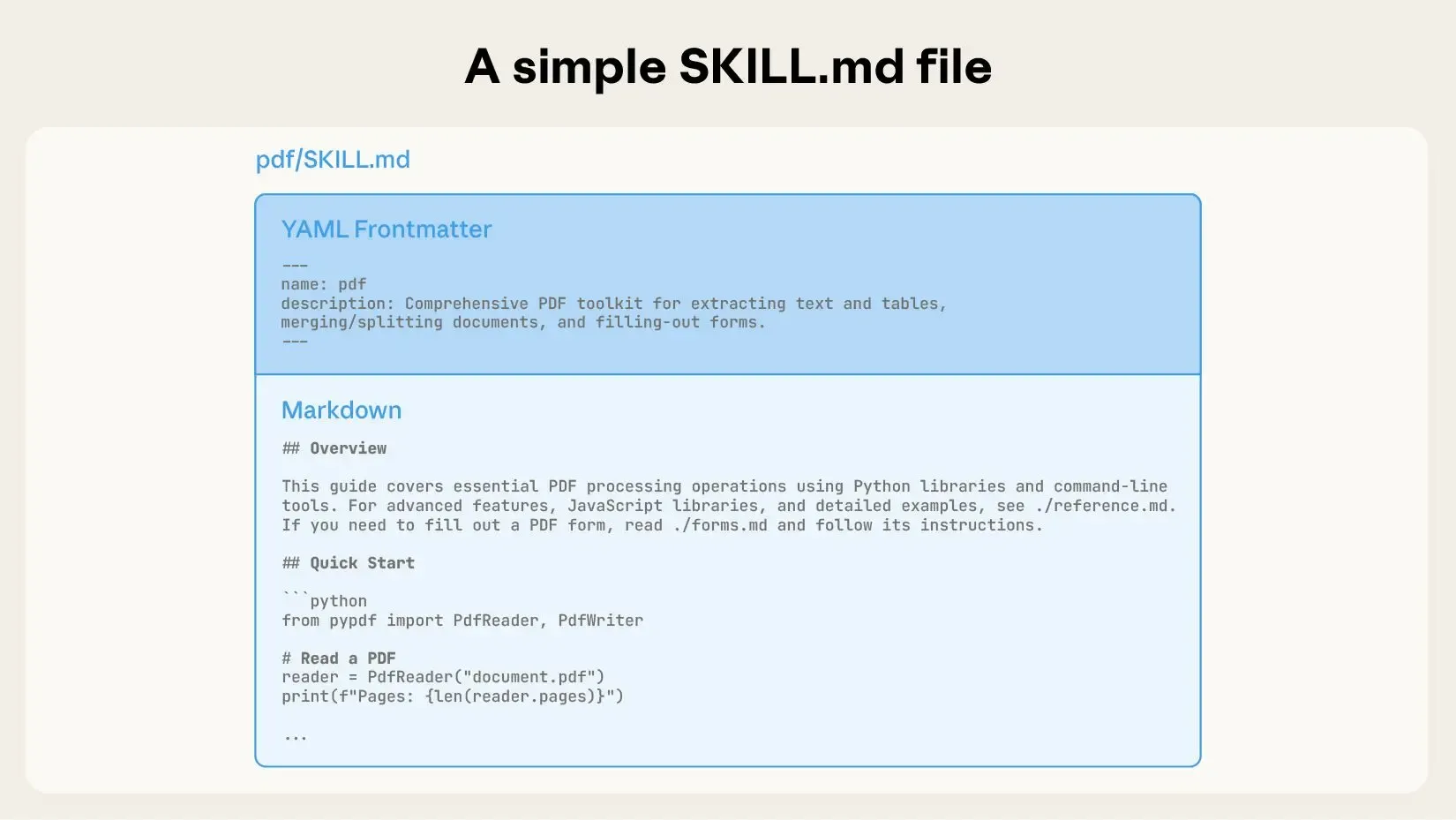
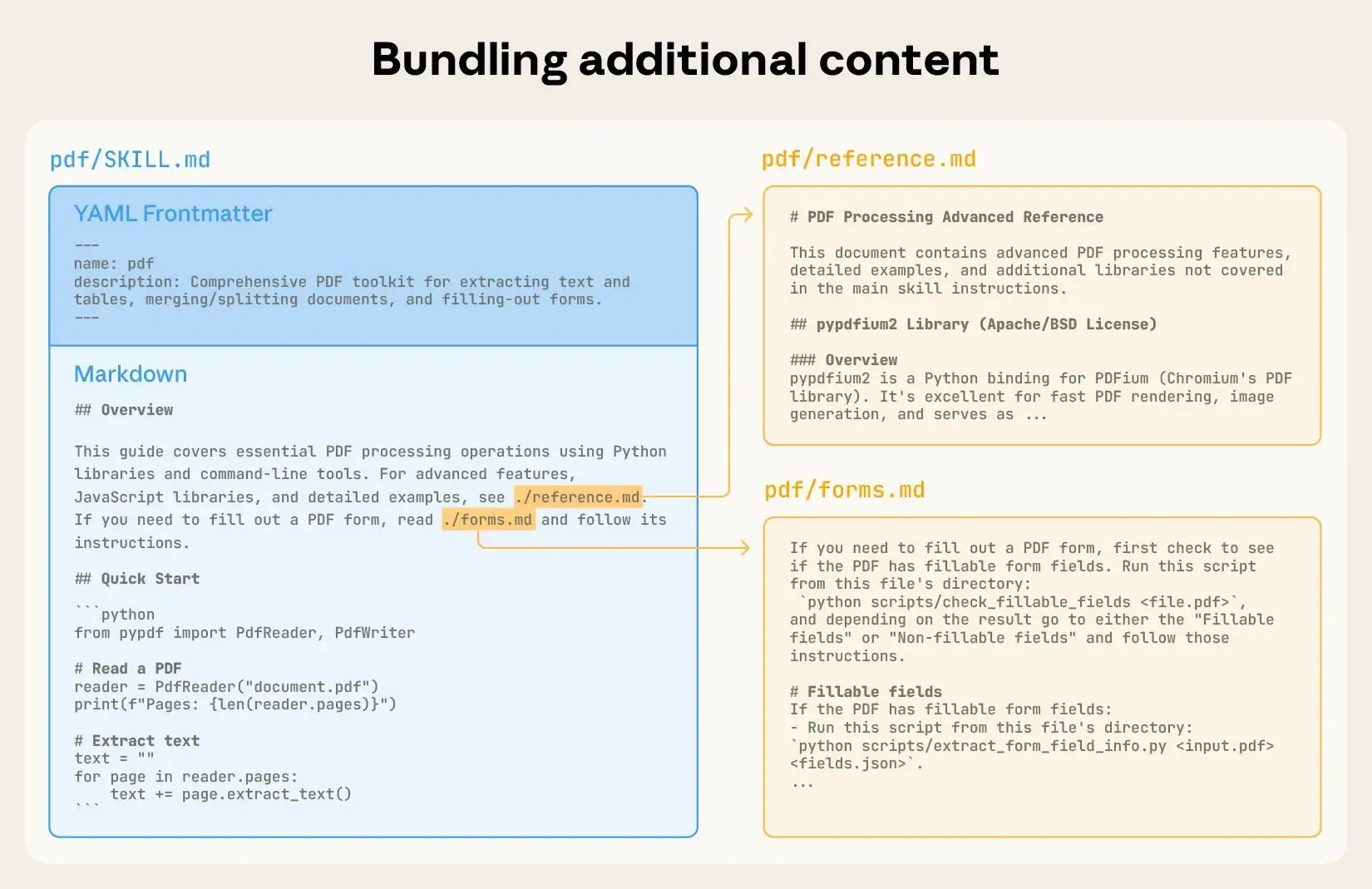
When skills get bigger and more complicated, they might have way too much stuff to cram into just one SKILL.md file—or maybe some info that’s only useful sometimes. When that happens, you can throw extra files into the skill folder and just name-drop them in SKILL.md. These extra files are the third level (or even deeper) of detail that Claude can dig into whenever it actually needs to.
Take the PDF skill example below: the SKILL.md mentions two other files (reference.md and forms.md) that are sitting right there in the folder. By splitting out the form-filling stuff into its own file (forms.md), the person who made the skill keeps the main part nice and tidy, knowing Claude will only peek at forms.md when it’s actually filling out a form.
Skills and the context window
Here’s a diagram that shows what happens to the context window when a skill gets triggered by what you’re asking.
Skills pop up in the context window through your system prompt.
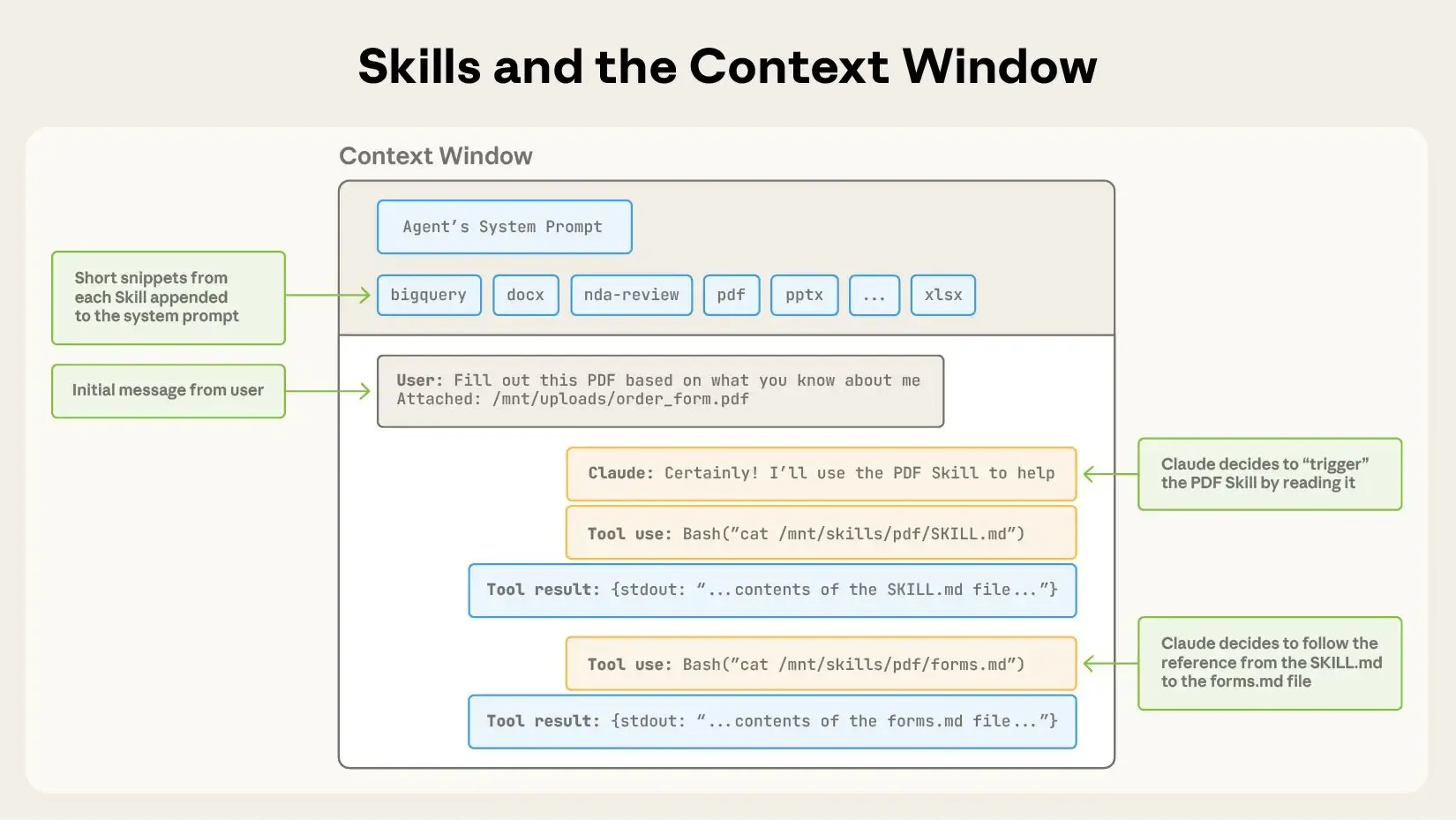
Here’s how it all goes down:
- First up, the context window’s got the main system prompt and a little info about each skill you’ve installed, plus whatever you just asked;
- Claude kicks off the PDF skill by running a Bash tool to pull up
pdf/SKILL.md; - Claude decides to also check out the
forms.mdfile that comes with the skill; - And finally, Claude gets to work on what you asked for, now that it’s loaded up the relevant stuff from the PDF skill.
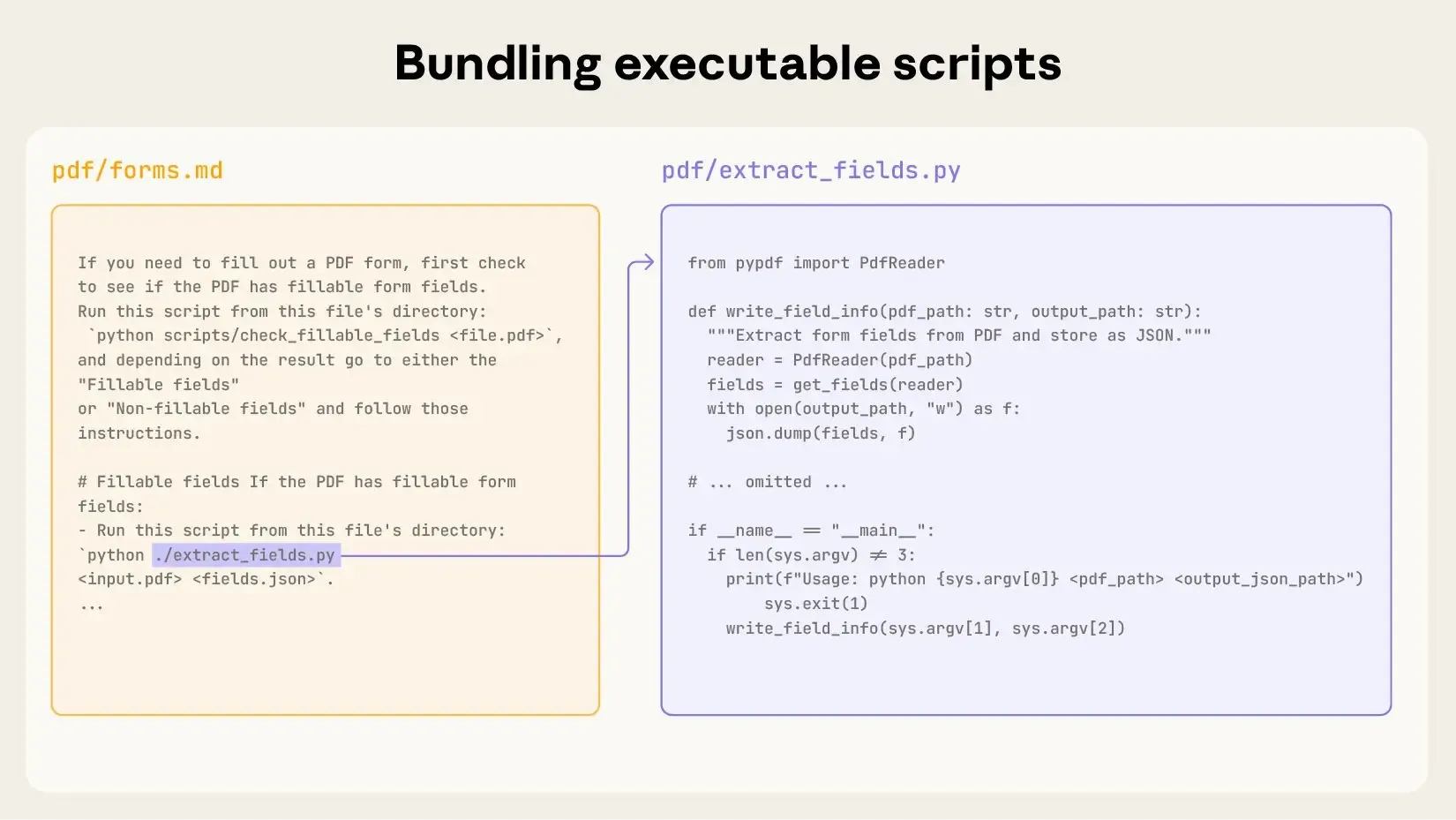
Skills can also pack in some code that Claude can run whenever it needs to.
LLMs are great at a ton of stuff, but sometimes it just makes more sense to let regular code handle things. Like, sorting a list by generating tokens? Way more expensive than just running a quick sorting algorithm. Plus, a lot of apps need that rock-solid, predictable behavior that only code can give you.
In our example, the PDF skill has a Python script already written that reads a PDF and pulls out all the form fields. Claude can fire off that script without even loading the script or the PDF into its context. And since code does the same thing every time, this whole thing is super reliable and repeatable.
Conclusion
Claude Skills represent a fundamental shift in how we interact with AI assistants—moving from generic, stateless conversations to specialized, context-aware agents that handle complex, organization-specific workflows. By combining progressive disclosure with modular design, Skills solve two key challenges: context window limitations and repetitive prompting. This makes Claude both more powerful and more practical for real-world use.
The beauty of this system lies in its simplicity. A folder structure, some Markdown files, and optional scripts are all you need to transform Claude into a domain expert. Whether you’re automating form-filling, enforcing code standards, or managing ticket workflows, Skills provide the scaffolding to encode your team’s knowledge and procedures in a way that’s discoverable, maintainable, and efficient.
As AI integrates deeper into our daily work, the ability to customize and specialize these tools becomes critical. Claude Skills aren’t just a feature—they’re a blueprint for how AI agents can evolve from general-purpose assistants into true collaborators that understand your specific needs, your processes, and your context. The future of AI isn’t just about smarter models. It’s about models that can be taught to work the way you do.